
Greetings, prisoners!
This week we’ve made progress on several aspects of this phase focused on structure and basic elements, which is where we are now and will remain for quite some time.
Last week we discussed the new Room Editor tool and its functionality for creating animations. This week we’ve already fixed some bugs that appeared in the previous build, where animations now work across different cameras and continue from the frame the last camera was on before the transition.
Cursors
We’ve implemented an initial version of animated cursors to start providing feedback on what element is under our cursor—that is: a door, a transition zone, an interactive object, etc…
Chat
Among the current chat features, you’ll find the following:
- Rich text: Tags for colors and text formats (bold, italic, and color)
- Emojis: We have currently added basic emojis in two formats: by reference (something we plan to remove in the future) and by Unicode code (this will help with using virtual keyboards that include these icons, such as on macOS)
Another chat feature we think might be interesting for the future—both for debugging by the staff and for the future creation of mods by game enthusiasts—is reflection commands.
This tool allows you to execute functions by reflecting on specific game elements. The main idea behind this is to provide an early way to modify the game in-game, one of the pillars for enabling modding.
The video below shows an example of this: Since there is a specific class for cursor control and it includes the IGameCommand interface, this tool allows you to call any function (such as the SetCursor function in the example) from within the game itself, overriding its behavior—in this case, switching to the “standard” cursor even when the normal behavior (without using this command) is to use the zone-scrolling cursor.
To do this, we must specify commands using the following syntax:
//<class> <func_name> [<(Type)param>]
Ejemplos:
//cursor setcursor (Carcel.UI.Cursor+ECursors)MoveTo
//roommanager loadroom (System.String)CorridorL_Auto_Room
Doors
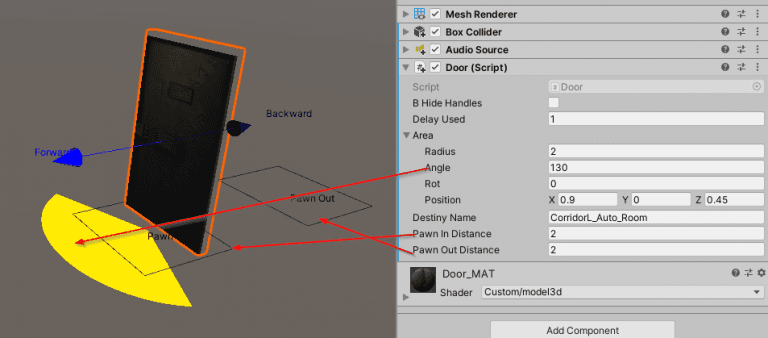
The latest feature we’ve added to rooms is doors and interactive objects. Despite how simple they may seem, we had to consider a few things:
- Interaction area for all interactive objects. This includes doors, of course, and allows us to specify the random area where a character must be located to perform the object’s action.
- Final transition zone: When changing rooms, we must head to the door, wait for it to open once we’ve arrived, and continue walking toward “the back” to trigger the loading screen. All of this is still incomplete, and we’ve only designed the UI to automate and streamline the creation of these doors.

Here’s a video showing almost all the features we’ve discussed today:
Server Architecture
We have redesigned the server structure to streamline the use of each server and increase, as much as possible, the number of concurrent users without having to purchase the professional version of the framework we use for the netcode.

Up until now, we had a single server where we had deployed all the elements. Considering that the user limit imposed by the framework is 100 users, this meant that if there were 90 people playing and 10 in the login area (character selection and all that), no one else could connect or even log in.
We have now split this entire process across three servers: one for login, one for the database, and one for each prison. The database server has no limit on concurrent queries (beyond its own technical limits), but both the Login server and the Prison servers will consume this 100-user limit—though with this new structure, each will handle 100 users. In other words, 100 people logging in at the same time as 100 others are playing in one prison and another 100 in a different prison. And all at the same time.
Greetings to all!
The new La Prisión team.
COMMENTS
1 comment
You need to be signed in to comment.
Sign inGrandes seguir a si !! animos !!